Place Elements by CAD - Autodesk Revit Add-in
이미지
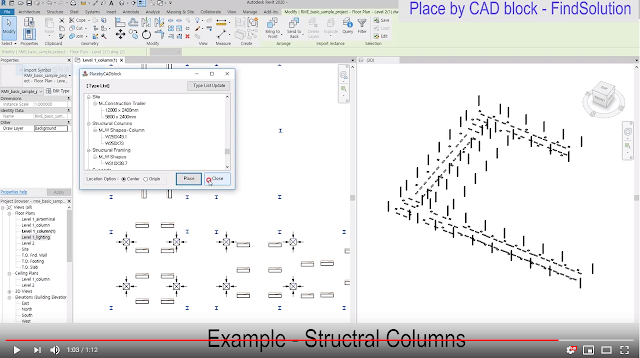
Place Elements by CAD Place components elements using imported CAD block location Components elements are columns, generic models, etc. Imported CAD block is a part of CAD files. This app helps place component elements at CAD block location automatically. General usage instruction 1. Import CAD file. 2. Partial Explode imported CAD file. 3. Select CAD block to place elements. 4. Click App and select family type and click place button Video :   https://www.youtube.com/watch?v=H1Qjn_okTu4
MEP_UpDown - Autodesk Revit Addin

이미지
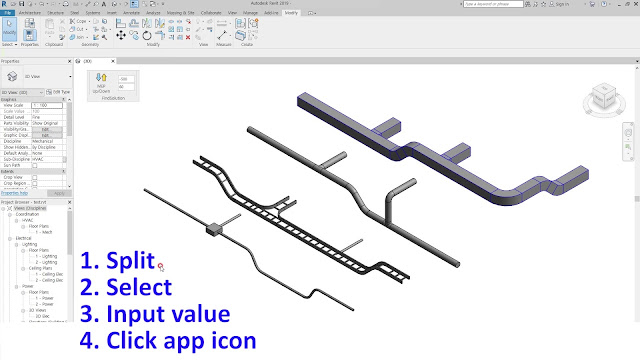
MEP_UpDown - Autodesk Revit Addin Up Down tool for MEP elements - Duct, Pipe, CableTray, Conduit. To avoid clash, MEP elements (duct, pipe, cabletray, conduit) need to level up or down. This app helps it. With splitting the elements and input offset/angle value, the app redraw elements level up or down. The app works with any language version of Revit , but command is english. video :  https://youtu.be/sTQMZrA5HAI Download :   https://apps.autodesk.com/RVT/en/Detail/Index?id=5443718852969449845&appLang=en&os=Win64 General Usage Instructions 1. Split mep elements (ducts, pipes, cabletrays, conduits). 2. Select elements need to up / down. 3. Input offset and angle value. (unit = project unit) 4. Click app icon to operate. ( Up or Down for single element ) ( Up and Down for single elemens ) ( Up and Down for multi elemens ) ( Offset and Angle value ) Support Information findsolution.quantum@gmail.com

Type Browser - Autodesk Revit Addin

이미지
App Name Type Browser Introduction Video App Short Description Select Type for create or change elements using this Type Browser. App Description This type browser can select type easily for create or change elements type. Create elements : select type in the list -> double click -> create mode is active. Change type of elements : select type in the list -> double click -> elements type is changed. General Usage Instructions

Autodesk Revit Addin - SectionBoxControl

이미지
App Name SectionBoxControl  App Short Description It rotate, resize, and move the section box. App Description This addin control the section box about rotation, resize, and move. Section Box is useful function of revit to navigate the model. But it is sometimes hard to operate because the handle is too small and we couldn't know the distance. So this addin control the section box using window instead of handling directly. General Usage Instructions

Autodesk Revit Addin - Polygon Select

이미지
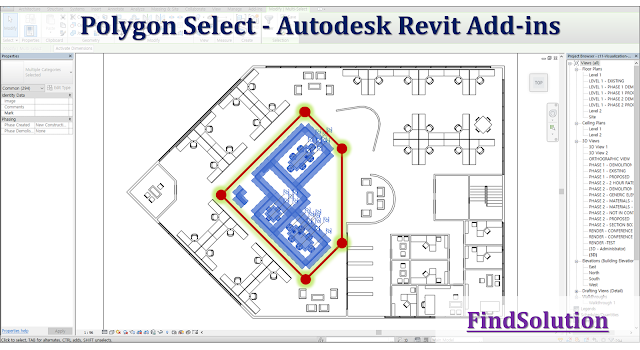
App Name Polygon Select - youtube :  https://youtu.be/vQoBJfcog8w App Short Description To select multiple elements, draw polygon shape then elements will be selected in this polygon area. App Description Revit provides method to select multiple elements by drawing a rectangle shape . If the layout of elements is complex , this method using only rectangle shape is not efficient . We need to more various shape to select multiple elements. So this app provides additional method to select multiple elements by drawing various polygon shapes . General Usage Instructions - Run this Polygon Select add-in in 3D view(top of viewcube only), floor plan, or ceiling plan view. - Draw any polygon shape then elements will be selected in this polygon area. - Inside Method : Elements are completely within the boundary of the polygon. - Intersect Method : Elements are wholly or partially within the boundary of the polygon. * If there are elements th...

Autodesk Revit Addin - Element Information

이미지
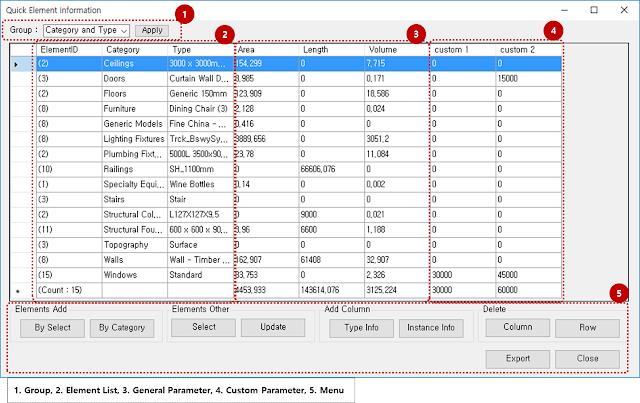
Element Information [App Short Description] List elements and information, rather than Revit schedule. - Autodesk App Store : https://apps.autodesk.com/RVT/en/Detail/Index?id=6061281182084579542&appLang=en&os=Win64 - Youtube : https://youtu.be/4MaktiIjwXQ [App Description] - Easy to show element list by select or by category. - Easy to get all parameter information include custom parameter. [General Usage Instructions] - Run [Element Information] add-in. - Add/remove elements by select or by category in a project. - Add/remove type or instance parameter information. - Update list after some change made in a project. - Export list data to CSV file and open in Excel program. [Elements Add -> By Select] [Elements Add -> By Category] [Elements Other -> Select] [Elements Other -> Update] [Add Column -> Type info] [Add Column -> Instance info] [Delete -> Column] ...

Revit Category

- model category Air terminals Areas Cable Tray Fittings Cable Trays Casework Ceilings Columns Communication Devices Conduit Fittings Conduits Curtain Panels Curtain Systems Curtain Wall Mullions Data Devices Detail Items Doors Duct Accessories Duct Fittings Duct Insulations Duct Linnings Duct Placeholders Ducts Electrical Equipment Electrical Fixtures Entourage Fire Alarm Devices Flex Ducts Flex Pipes Floors Furniture Furniture Systems Generic Models HVAC Zones Lighting Devices Lighting Fixtures Lines Mass Mechanical Equipment MEP Fabrication Containment MEP Fabrication Ductwork MEP Fabrication Hangers MEP Fabrication Pipework Nurse Call Devices Parking Parts Pipe Accessories Pipe Fittings Pipe Insulations Pipe Placeholders Pipes Planting Plumbing Fixtures Railings Ramps Raster Images Roads Roofs Rooms Security Devices Shaft Openings Site Spaces Specialty Equipment Sprinklers Stairs Structural Area Reinforcement Struc...